November 30, 2010 By Cheryl
If you are anything like me, you subscribe to a lot of blogs. And on a daily basis you find things you want to remember………maybe a great craft tutorial, recipe, how to edit photos or maybe just something you’d like to share with your readers or friends. Well, what if you had an easy way to help you remember all of that great stuff you find online?
People, I would like to introduce you to your new friend {with a GREAT memory}………Tumblr
Tumblr.com is a free and lightweight blogging platform, aimed at making it effortless to share text, photos, quotes, links, music, and videos, from your browser, phone, desktop, email, or wherever you happen to be, and doing it the quick and easy way!
I use Tumblr as my “online idea notebook” and I call mine TidyMom Finds. Go ahead a click over, take a look, I’ll wait………………
Fun isn’t it? Just a collection of pictures and links to things I’ve found and like.
Don’t worry, it’s not time consuming. I know many of you are thinking ” I blog, facebook , and twitter…how could I possibly add another platform to that list?” But Tumblr is SO easy after you sign up and set up your tumblr blog, you add content with just a few clicks……..you can even have it automatically send out a tweet when you add a new post.
Come along, I’ll show you some of the basics!
First remember………..Tumblr is about SIMPLICITY. Not a place you have to worry about making all fancy with pretty layouts and such. You literally sign up and can begin posting with in a minute.
After you sign up you can customize your Tumblr blog by clicking on theme and you can choose from several themes, each will determine the layout of your page. Appearance will change colors. Save and close. Play around with it for a bit until you find a look that you like. This can all be changed later if you wish.
Below you can see how I customized INFO on my Tumblr blog

Click on SERVICES to have your Tumblr posts sent to Twitter or Facebook.

Here’s a look at what your Tumblr Dashboard will look like

See how I’ve circled “Goodies” – click that, it’s what is going to make Tumbling so quick and easy! You will just drag the “Share on Tumblr” bookmarklet to your toolbar – see the RED ARROW in the picture above.
Now you are all set to start Tumbling. By having that bookmarklet you wont even need to go to your Tumblr Blog to make a post.
I’m going to share how I post to my TidyMom Finds, but you can play around with it and post how ever you’d like.
I don’t go looking for things on my tumblr blog, I just add to it when I’m browsing sites. Anytime I see something that I want to remember or share with others…….this is what I do.
*Note, be SURE you are on the permalink and not the main blog address.

- Click “Share on Tumblr” in my tool bar. A tumblr box will pop up and it will automatically add information from the post. (you can change the Name/Post title if you wish)
- I usually add a little bit of text next
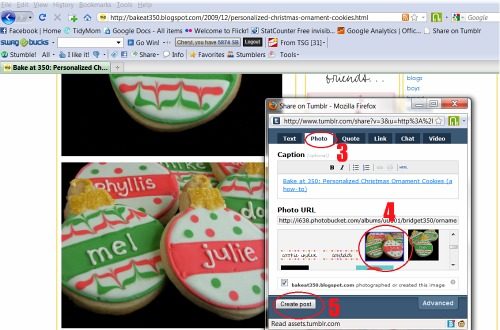
- Click the “photo” tab if you want a photo from their page to add to your tumblr post
- Click on a photo you wish to have in your post
- Click “create post”

The Tumblr Box will say done and close. That’s IT!
If you want to check your Tumblr Blog to see if it posted just click your Tumblr url to see.

Now when I’m ready to bake Christmas cookies, I’ll know where I found some good ideas and tips!
Click here to see the post on my Tumblr blog. Basically all it is, is a link to Bake at 350 blog post about her Personalized Christmas Ornament cookies .
See, it automatically posted to my Twitter account as well!

and if you ever need to edit or delete a post, go to your dashboard and to the right of each post you will see delete edit

WHEW!! I know it seems like a lot……..but really it’s so simple and a great way to keep track of things you want to remember and/or share.
I keep a link to my Tumblr blog, TidyMom Finds in my “connect” buttons on my blog

Now go sign up and start tumbling!!
